Was your encrypted Tesla footage deleted?
For deleted encrypted Dashcam or Sentry footage, read Can You Recover a Deleted Tesla Clip That Was Encrypted?, then start with a free ClipSalvage scan.
Why are Tesla clips encrypted now?
Tesla software 2026.20 turned on USB clip encryption by default on supported vehicles — those with the AMD Ryzen infotainment computer (Model 3, Model Y, the refreshed Model S and Model X, and Cybertruck) — and every release since has kept it. From the moment the update installs, every new Sentry Mode and Dashcam clip a supported car writes to the USB drive is encrypted, unless the owner switches the setting off (see below). This is a privacy feature: an encrypted clip can't be opened by simply plugging the drive into a laptop, the way an ordinary Tesla MP4 file always could.
The change is silent — there's no per-clip prompt. Encrypted recordings are saved to a TeslaCam/EncryptedClips folder alongside the familiar SentryClips, SavedClips and RecentClips, and the clip files themselves are no longer plain, playable MP4 video.
Why MP4-signature carving misses encrypted clips
Generic recovery tools find video by scanning the raw drive for the MP4 signature that marks the start of a file — a technique called file carving. An encrypted clip is written as a per-file encrypted container instead of a plain MP4: the MP4 signature and the video data behind it are scrambled, so a carver looking for MP4 headers doesn’t recognise the clip as video, and anything it does return stays unplayable until it is decrypted. The decryption keys are sealed to the specific vehicle, held by Tesla and released only to an authenticated Tesla sign-in, so recovering the bytes is not enough on its own. You can't simply copy the clip to another computer and open it.
How ClipSalvage recovers and decrypts encrypted clips (v2.20.0+)
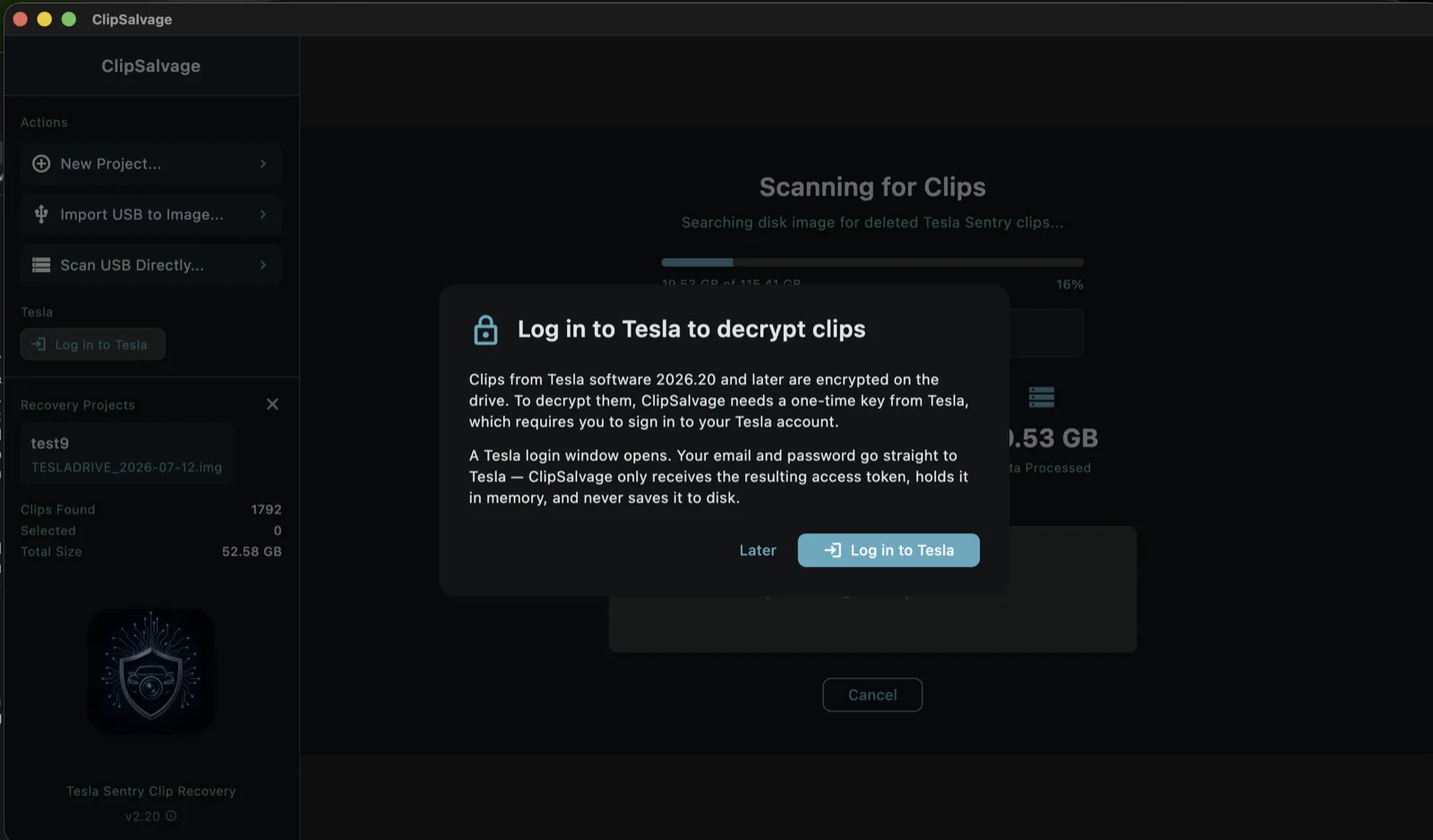
Since v2.20.0, ClipSalvage reads Tesla's encrypted clips and decrypts them back into playable video. The flow, end to end:
- Scan as usual. ClipSalvage finds both plain and encrypted clips on the drive — deleted, formatted, or corrupted alike.
- View available thumbnails and recovery assessments.
- Sign in to Tesla when prompted to obtain available keys for your clips.
- Sign in again if prompted for other recordings. Cached keys can avoid repeated requests for the same clips; other recordings may require another sign-in.
- Recover surviving footage from partly overwritten clips. Results depend on the video data that remains; overwritten footage cannot be recreated. Free and Pro use the same repair capabilities.
Privacy: the Tesla sign-in is used only to fetch your own clips' keys. All recovery and decryption run entirely on your machine — footage, thumbnails and disk contents are not uploaded.
Which clips are recoverable?
The dividing line is the moment the update installed — but both sides of it are now recoverable:
- Clips saved unencrypted (before software 2026.20, or with the setting off) are standard, unencrypted MP4 files. They are recoverable exactly as before — even from a drive that has since been formatted, corrupted, or had files deleted, as long as the sectors haven't been overwritten. Time in a drawer rarely changes this; new writes do.
- Clips saved with encryption on are encrypted containers. ClipSalvage recovers them and, after the Tesla sign-in when prompted, decrypts them into playable MP4s. Partially-overwritten ones are automatically repaired where possible.
Either way, a free ClipSalvage scan will show you what's on the drive — with thumbnails and per-clip recoverability, encrypted or not — before you pay anything.
Should you turn USB encryption off?
You no longer have to for recovery's sake. The setting still exists under Controls > Safety > Encrypt Dashcam Recordings, and the trade-off is now simpler:
- Encryption on protects your clips from being read if the drive is lost or stolen — and with ClipSalvage v2.20.0+, you keep the ability to recover and decrypt them after a format, corruption, or deletion.
- Encryption off keeps clips as ordinary MP4 files that any recovery tool can carve back — but those files can be read by anyone who plugs the drive into a computer.
Decrypting from the car is one-way
There is a third option that is easy to reach for and worth understanding before you use it: the padlock icon in the car’s Dashcam app, which decrypts one clip. Tesla’s 2026.20 release notes describe it as a way to “decrypt a specific clip, making it easier to see the footage if they mount the USB drive to their computer” — that is, the clip is made readable on the drive, not just on the car’s screen.
In our own testing on a 2026.20 vehicle, once a clip has been decrypted this way the padlock for it is gone and the option does not come back. So it is a one-way action, and it has a consequence Tesla does not spell out: that clip no longer carries the protection encryption was added for. Tesla’s stated reason for encrypting in the first place is that a USB drive taken from the car would otherwise expose up to 24 hours of driving — where you live, where you work, when you are away. A clip you decrypted in the car to watch once is readable by whoever ends up with the drive.
That is a fine trade to make deliberately. It is a poor one to make by accident on a drive full of footage. If what you want is playable files on your computer, decrypting from the drive on the computer — with Tesla’s web viewer or a desktop tool — leaves what is on the USB alone.
If you've already lost footage
Stop writing to the drive immediately — don't put it back in the car. Then run a free ClipSalvage scan. Clips saved unencrypted are ordinary MP4 files and the scan will find them. Clips recorded with encryption on show up too — previewed free with real thumbnails — and a Tesla sign-in when prompted lets ClipSalvage decrypt them into playable video. Decrypting them costs nothing, however many there are.
What this means going forward
Encryption doesn't change the physics of the drive — formatted or deleted clips still sit in their sectors until something overwrites them, as covered in what formatting actually does and how long footage stays recoverable. What encryption changes is whether those sectors hold readable video or encrypted containers. For unencrypted clips, everything about recovery works as it always has. For encrypted clips, recovery now takes one extra step — a Tesla sign-in when prompted to fetch your keys — and runs using cached keys for those clips.
Sources & references
- Tesla owner's manual — Dashcam & Sentry Mode (USB drive and the Controls > Safety encryption toggle)
- ClipSalvage guide — how encrypted-clip decryption works (the full step-by-step flow)
On encrypted clips: Tesla encrypts USB clips by default on supported vehicles — those with the AMD Ryzen infotainment computer (Model 3, Model Y, the refreshed Model S and Model X, and Cybertruck) — and every release since software 2026.20 has kept it. On a supported car, every Sentry and Dashcam clip written since that update is an encrypted container unless the owner has switched Controls > Safety > Encrypt Dashcam Recordings off. Clips recorded before the update, clips recorded with that setting off, and clips from cars without the feature (cars with the older Intel infotainment computer, and vehicles in mainland China, where Tesla has not enabled it) are ordinary MP4 files that ClipSalvage recovers as normal; the decryption features simply do not apply to them. Your car’s software version is shown under Controls > Software. ClipSalvage decrypts only clips recorded by a vehicle on the Tesla account that vehicle was linked to at the time of recording: the keys are held by Tesla and released solely to an authenticated sign-in, so footage from someone else’s car cannot be decrypted by this or any other tool. Recovery of deleted or formatted clips also depends on the sectors not having been overwritten — a drive that kept recording may have nothing left to recover, which is why the free scan shows you what survives before you pay.
Related reading
- Can TestDisk or PhotoRec recover encrypted Tesla clips?
- How to batch decrypt Tesla’s encrypted Dashcam & Sentry clips
- What happens to Tesla dashcam data when you format the USB drive?
- How long is Tesla dashcam footage recoverable after formatting?
- File carving explained for Tesla owners
- Recover deleted Tesla Sentry & Dashcam videos — the complete step-by-step guide